
This is probably the first question when your business started expanding, and your inventory management solutions started falling apart.
If you have realised this gap and are looking for a new system for your business that provides visibility into your inventory, whether in a warehouse or manufacturing facility, then it’s time to replace the inventory system.
Your complete inventory management software should be in a form that allow tracking inventory, streamline sales, fulfilling orders, and oversee warehouses from a single window.
But contrast to reality, 63% of warehouses are still described as fully manually operating their warehouse operations.
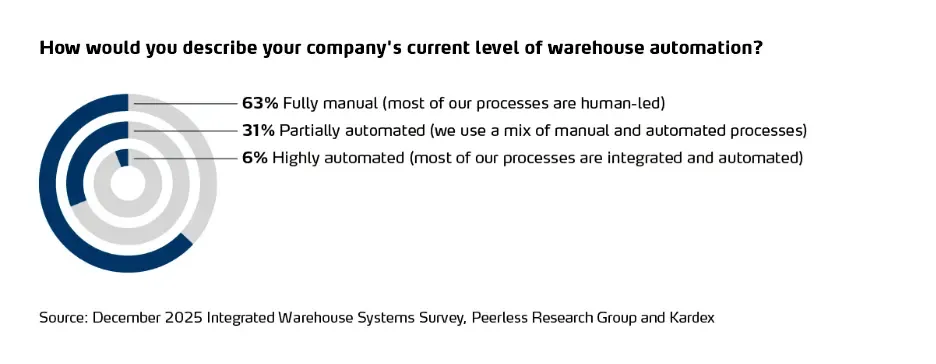
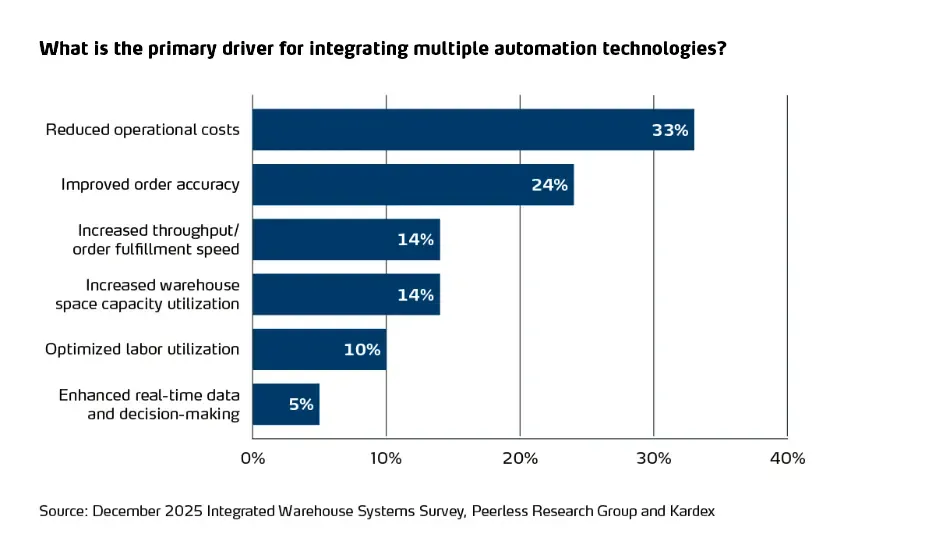
64% of warehouses said that their systems are partially connected, but one in three warehouses that are already using ASRS and other advanced automation have confirmed the following impacts:
Why Inventory System Migration is Important and How to Upgrade it Rightly?
If you are trying hard to bring every operation in a perfect rhythm, but still your efforts are not responding in a way, then it’s time to pay attention to your system. But most of them hesitate to move from legacy inventory systems to modern platforms, because their concerns are very real:
- What if our warehouse stops processing orders during inventory system migration?
- What if inventory counts go wrong?
- What if ERP and Accounting stop syncing the data?
- What if we lose transaction history?
- What if we experience downtime during the peak sales?
Well these fears are not exaggerated, they are based on real migration failures. According to the industry research:
- Nearly 70% of digital transformation projects face delays or disruption due to data migration challenges.
- As per Gartner report, poor data quality costs organizations an average of $12.9 million annually.
- Every one hour of system downtime is distribution operations can cost thousands in lost revenue and delayed shipments.
Therefore, a poorly planned inventory system migration doesn’t just create IT issues, it creates operational complexity. This is exactly where warehouses know the need to replace inventory system infrastructure, they must upgrade inventory management software to scale- but the fear of downtime keeps them stuck.
However, with GOIS, you can achieve “Zero downtime inventory migration is achievable.” Experts at GOIS follow well-structured planning, phased execution, ERP inventory alignment, and parallel system validation. Businesses can achieve seamless inventory system transition without interrupting operations.
Top Practices for Inventory System Migration Without Disruption
While looking for an inventory system migration, you need to clear the myth that it can either strengthen your operations or temporarily destabilize them.
The difference lies in the execution of transitioning the system.
Businesses that rush to replace inventory systems often face stock mismatches, integration breakdowns, reporting errors, and operational downtime. On the other hand, companies that follow structured migration practices successfully transition to modern platforms without disrupting daily operations.
If you’re planning an inventory system migration, here are the top practices you need to follow for smooth transition.
1. Start with a Complete Data Audit
Before you upgrade inventory management software, first clean your foundation.
Migration of inventory management system is depending upon data quality you currently have. If your legacy system contains duplicate SKUs, inconsistent naming conventions, incorrect units of measurement, or outdated supplier records, those issues will automatically carry forward into the new system.
To make it work rightly, it important to:
- Remove duplicate SKUs
- Standarde your product codes
- Validate supplier and vendor records
- Reconcile physical stock with system balances
- Close outdated purchase or sales orders
Deeply clean your data to reduce frictions in transitions and obtain accuracy with system migration.
2. Understand your Migration Needs
Successful inventory system migration begins with clarity. Avoid saying like “we want a better system.” Dont assume your experts to know everything without explanation. It’s better to define measurable outcomes, like:
- Extracting real-time stock visibility across locations
- Automating triggering reorder points
- Improve reporting accuracy
- Seamless ERP inventory migration
- Multi-warehouse tracking capability
Clear objectives guide configuration decisions and prevent scope creep during switching inventory management systems.
3. Go for a Parallel System Strategy
The most effective approach to inventory software without downtime is running the legacy and new systems simultaneously. The pallel migration involves:
- Configuring the new system.
- Importing validated master data.
- Processing transactions in both systems.
- Comparing inventory outputs daily.
- Resolving discrepancies before full cutover.
This strategy ensures operational continuity and dramatically reduces risk during the inventory system transition.
4. Don’t Rush, Conduct Migration in Phases
Dont do all at transition once. A single large migration event increases disruption risk.
Instead, use a phased approach:
- Phase 1: Product and SKU master data
- Phase 2: Inventory balances
- Phase 3: Open purchase and sales orders
- Phase 4: Historical transaction data
- Phase 5: ERP and third-party integrations
Phased inventory software migration allows validation at each stage and prevents cascading errors.
5. Align ERP and Financial Systems Early
If your inventory system connects with ERP or accounting software, ERP inventory migration must be handled carefully.
Ensure:
- Chart of accounts mapping accuracy
- Costing method alignment (FIFO, LIFO, weighted average)
- Procurement workflow synchronization
- Real-time financial reporting validation
Cross-functional coordination between operations, finance, and IT is critical to avoid reporting discrepancies post-migration.
6. Plan a Controlled Transition
Even in zero downtime inventory migration, there is a final activation moment.
To minimize disruption:
- Schedule cutover during low-transaction periods
- Freeze transactions briefly
- Reconcile final stock counts
- Import last-minute changes (delta updates)
- Validate integrations immediately after activation
Because of parallel testing, the final transition becomes predictable and controlled.
7. Before Going Live, Give Training
Many inventory system transitions fail not due to technical issues, but because teams are incapable of adopting the change.
Best practices include:
- Role-based training sessions
- Real-life scenario simulations
- Warehouse workflow testing
- Procurement and finance training
- Clear SOP documentation
User readiness ensures smooth adoption and prevents reversion to manual tracking methods.
8. Establish a Post-Migration Monitoring Practice
Migration does not end at go-live. For the next 30 to 60 days post-implementation monitoring is important. You need to:
- Monitor inventory accuracy daily
- Validate ERP synchronization
- Review reporting consistency
- Track order processing performance
- Collect user feedback
Proactive monitoring helps catch small issues at the early stage before it turns into escalations.
What Zero Downtime Inventory Migration Really Means
Zero downtime inventory system does not mean zero effort. It means:
- No halted order processing
- No more delays encountered in shipment
- No customer-facing disruptions
- No financial reporting breakdowns
- No warehouse shutdowns
When tightly planned ERP inventory migration, switching inventory management systems becomes a structured operational upgrade not a business interruption.
Final Words
This blog has clearly guided the migration practices for inventory software without downtime. This is a high time to realize that inventory system migration is not just a technical project, it is an operational transformation that needs a well-planned strategy.
Businesses that follow structured practices which includes data cleanup, phased migration, ERP alignment, parallel validation, and user training, can successfully replace inventory systems and able to upgrade inventory management software without disruption.
If your legacy system is limiting visibility or scalability, the question is no longer whether to migrate but how to do it without disruption. You can contact us for the seamless inventory migration transition.
Frequently Asked Questions (FAQ’s)
1. What is inventory system migration?
Inventory system migration is a well-structured approach of transferring product data, stock balances, transaction history and operational workflows from a legacy systems to modern inventory management system.
2. Can inventory software migration be done without disruption?
Yes, inventory software migration can be completed without disruption by using a parallel system strategy, phased data migration, and a controlled final cutover process.
3. How long does inventory system migration take?
The average duration of inventory system migration depends on the data volume, number of integrations, warehouse complexity and ERP alignment requirements. Depending upon these factors, migration for small business would take 4 to 8 weeks whereas enterprise level ERP integrations or migrations take around 3 to 6 months.
4. What are the biggest risk during inventory system transition?
The primary risk during inventory system transition includes:
1. Poor quality data
2. Inventory balance mismatches
3. ERP inventory migration failures
4. Integration breakdowns with POS or eCommerce platforms
5. Operational downtime during cutover
6. User adoption challenges

Naushad Ahmed 
Naushad Ahmed is a technology expert at Goods Order Inventory (GOIS) specializing in inventory management, order fulfillment, and warehouse operations for small and mid-sized businesses. He shares practical insights on inventory control, stock accuracy, automation, and multi-location management to help businesses move beyond spreadsheets, reduce stockouts and overstock, and scale their operations efficiently.