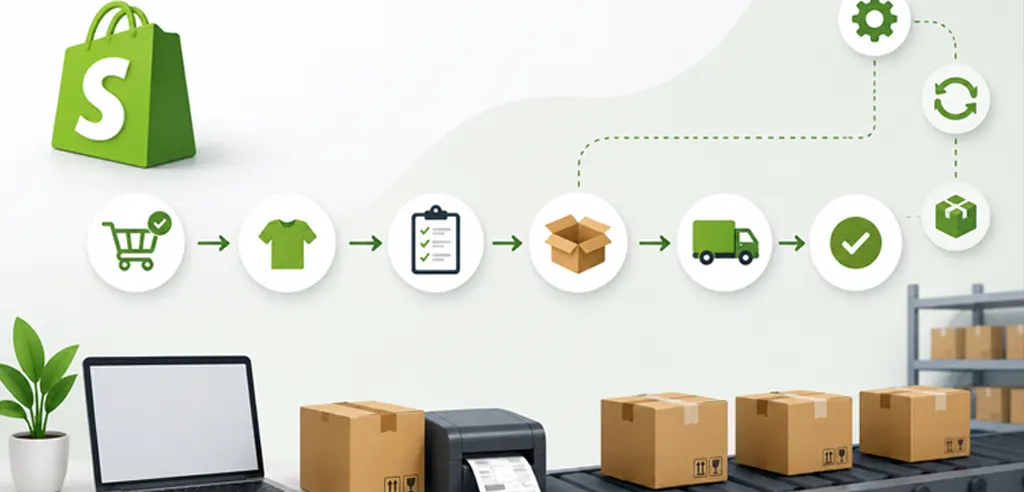
This guide walks through a fully automated Shopify order fulfillment workflow using GOIS (Goods Order Inventory System), covering every phase from the time the order comes in to the time an invoice is sent to your accounting system. No “short cuts” and no “handwaving.
What Is Shopify Order Fulfillment — and Why Does It Break Down?
Order Fulfillment in Shopify is the receiving of an order, picking and packing, shipping and updating the order status in Shopify. Simple in concept. Complex in execution.
As every Shopify merchant scales, they encounter the same roadblocks, and here are a few of the ones you’re likely to face:
- Orders must be manually exported or imported into a warehouse/system or inventory.
- Warehouse employees access picklists and perform work without any real-time accuracy.
- Carrier portals need to be switched on for shipping labels.
- Shopify fulfillment status should be set manually upon shipping. There is no consistent sync between the storefront and inventory counts due to inconsistencies.
- The inventory counts drift due to the lack of consistency.
- Invoices are generated and dispatched to accounts on their own and can be delayed or wrong.
All of these are manual hand-offs—a handoff is a point of failure. The solution is to integrate Shopify with a warehouse management system that manages the entire fulfillment process automatically.
See How GOIS Solves This
GOIS connects your Shopify store, warehouse, and accounting in one automated workflow — eliminating manual data entry, pick errors, and fulfillment delays from day one.
Book a Free Demo →The Complete Shopify Order Fulfillment Workflow with GOIS
Phase 1: Order Comes In — Shopify to GOIS in Seconds
The Shopify order fulfillment process begins the moment a customer places an order. Your order is instantly synchronized with GOIS when a customer places an order on your Shopify storefront. No manual import, no csv upload, no copy/paste order details. Shopify confirms the transaction, and GOIS gets it.
A workflow is automatically started from there:
- Your order is reviewed with your fulfillment rules.
- Once it is approved for shipment, it is based on certain pre-configured workflows (inventory availability, customer rules, etc.).
- Automatic generation of Warehouse Pick (no dispatcher required)
- This enables your team in the warehouse to see new orders in their queue in real time and take action.
This immediate sync is the foundation of fast Shopify order fulfillment. The sooner the warehouse knows about the order, the sooner it ships.
Phase 2: Warehouse Picking — Scan Gun to Shipping Station
In this phase, the picking order is scanned and moved to the Shipping Station.
Once the Warehouse Pick has been created, a picker takes a Zebra scan gun (or other barcode device) and then go to the floor.
As they pick, they scan items, progressing through the pick list on the device. The process will be scan-based, which eliminates pick errors that manual paper or eyeballing SKUs can cause. After the order has been picked, the picked order is then physically transported to the shipping station.
No paperwork. No radio calls. No re-keying.
One of the most impactful actions to boost the accuracy of Shopify order fulfillment is to use scan-based picking. Seconds lost here due to a wrong pick. A wrong pick that is caught after delivery is much more expensive.
Phase 3: Packing — Automated Box Selection
When the container is ready for packing, the smart box selection is conducted in Phase 3.
The shipping station user is responsible for packing at the shipping station in the warehouse. GOIS gives two options:
- Manual packing: User makes or scans items into a packing document in GOIS and confirms what they pack into each carton.
- Auto-packing using workflow: GOIS automatically selects the appropriate box according to the following four conditions: the carrier, items to be shipped, the customer’s needs and the box size. The system will automatically find the best carton to be used.
This type of logic can really save a lot of time during the few days of the week when we get a lot of orders in and it removes the “let me find a box that fits” floor guesswork of high volume days.
In high volume Shopify order fulfillment, the speed of packing becomes vital to the number of orders shipped daily, making auto-packing more valuable.
Phase 4: Shipping Labels – One Click Every Carrier!
Packing is confirmed and the user can directly compare the rates of the different carriers (UPS, USPS, Fedex and other carriers are available from a single interface).
GOIS creates and prints shipping label with one click. When an order is sent out in several boxes, the order is consolidated and a single shipping label is created and printed, which will apply to all cartons being sent.
The Warehouse User will then label the boxes and place the packages in the carrier pickup area.
Now the physical side of Shopify order fulfillment is complete.
Phase 5: Order Close – Automatic Shopify Fulfillment
The user completes the order in GOIS. This single action automatically fills out the order to Shopify:
- Shopify order is set to fulfilled (no manual action necessary)
- The Shopify Fulfillment Notification is automatically sent to the customer
- Shopify is notified of the tracking information.
Zero manual work for Shopify. The “fulfillment flow” is fully executed from the close action in GOIS.
Phase 6: Invoicing and Accounting Sync
The order is also closed and an invoice is created in GOIS. Then that invoice automatically syncs to your accounting software of choice:
- QuickBooks Online
- QuickBooks Desktop
- AS400
- Other ERP / accounting systems through API / integration
The finance team to no longer have to go hunting for warehouse updates and no entry of data is made into the invoice by hand. Shopify order fulfillment and financial record keeping occur in the very same automated sequence.
Phase 7: Product Catalog Sync — Shopify as the Source of Truth
In addition to orders, GOIS keeps up to date with your Shopify product catalog by itself.
When a new item or variant is created in Shopify:
- It will automatically be added to GOIS and mapped to the Shopify product.
- Product images are automatically downloaded to GOIS.
Changes to an existing item or variant in Shopify (such as changing the price, description, weight, etc.) are synced to GOIS automatically. Shopify is the one place the catalog is — and GOIS is updated without having to manually manage two systems.
Phase 8: Inventory Management — GOIS as the Inventory Master
Shopify owns the catalog; GOIS owns the inventory. This is where stock levels are monitored, modified, and controlled. How the flow is working:
Purchasing and Receiving
- A user submits a Purchase Order to GOIS.
- The PO will be sent to the vendor through EDI, e-mail, cXML or API.
- Once the shipment reaches the warehouse, the user will get the shipment in GOIS (with or without scanning, according to the configuration).
- Once inventory is received it is added to GOIS.
Inventory Sync to Shopify
GOIS pushes inventories to Shopify at a configured time. Thus, your storefront remains accurate: users can see the actual remaining quantity and overselling is avoided at the origin.
Order Intake and Inventory Allocation
There are several ways to import sales orders into GOIS:
- Shopify (via automatic sync)
- EDI trading partners
- API integrations
- A GOIS user manually entered this data.
As soon as a sales order is created, the inventory is allocated to the sales order. The stock is reserved, and will not be sold or committed to other parties. This inventory is used when the order ships and is closed, which then decreases inventory on hand in GOIS and creates the next sync to Shopify.
This allocation and consume approach will maintain accurate inventory levels throughout the Shopify order fulfillment process, from order to delivery.
Why Automated Shopify Order Fulfillment Is No Longer Optional
Manual Shopify Order Fulfillment is suitable for low volume orders. It is difficult to scale and costs are incurred when it fails — late deliveries, backlogs of products, accounting delays, customer dissatisfaction.
Each hand-off in the delivery process is a waiting period and opportunity for error. This is the businesses that are winning with Shopify at scale and doing away with those manual steps—letting Shopify do the coordination, and your team do the physical work.
From accounting to inventory, shipping to warehouse and everything in between, GOIS synchronizes all parts of the operation into an automated Shopify order fulfillment workflow. This leads to quicker fulfillment, much fewer errors, and staff who spend some time on work they truly need to do.
Curious How This Workflow Fits Your Operation?
Let’s walk through it together — book a free demo with GOIS and see exactly how the Shopify fulfillment workflow maps to your warehouse, your carriers, and your accounting setup.
Book a Free Demo →
Naushad Ahmed 
Naushad Ahmed is a technology expert at Goods Order Inventory (GOIS) specializing in inventory management, order fulfillment, and warehouse operations for small and mid-sized businesses. He shares practical insights on inventory control, stock accuracy, automation, and multi-location management to help businesses move beyond spreadsheets, reduce stockouts and overstock, and scale their operations efficiently.