
Inventory distortion will cost retailers $1.77 trillion in 2023 (Source – Retail Touch Points)
A Quick Story (because this is real life, not a feature grid)
Anaya runs a 4-store specialty foods brand. QuickBooks handles accounting well, but her team spends evenings reconciling POs, counting jars, and chasing expiry dates. She’s not alone—multiple reports still find many small firms track inventory manually, which drives errors, stockouts, and cash tied up in the wrong items. ShipStation .
When Anaya upgraded to a QuickBooks-compatible inventory solution, she eliminated late-night reconciliations and manual errors. Her orders posted automatically, stock was adjusted at each location, and her accountant stopped chasing edits. That’s the promise you’re buying here. For small brands like hers, a QuickBooks-compatible inventory solution bridges the gap between simple spreadsheets and expensive ERP systems.
Cut 80% of Manual Inventory Work.
Save up to 30% in stock costs with QuickBooks-connected control.
What to Look for in a QuickBooks-Compatible Inventory Solution
The best QuickBooks-compatible inventory solutions should include features like barcode scanning, multi-location control, and real-time sync.

- Tight QuickBooks-compatible inventory solution sync – Keeps items, POs, invoices, and COGS in real-time alignment.
- Multi-location control – Tracks stock by site with easy transfers and cycle counts. Any solid QuickBooks-compatible inventory solution should let you transfer stock and run cycle counts.
- Barcodes + mobile scanning – Speeds up warehouse work and cuts entry errors.
- Assemblies/BOMs – Automates kitting and light manufacturing cost tracking.
- Lots/serials & expiry – Enables traceability and compliance for regulated goods.z
- Channel connectors – Syncs sales and shipping across Shopify, Amazon, and more.
- Role-based controls – Limits access and logs changes for security and accountability.
| How Inventory Software Like GOIS Works with QuickBooks Desktop and Online – Read More |
This guide compares leading QuickBooks-compatible inventory solution like GOIS, SOS Inventory, Fishbowl, Cin7 Core, and Katana.
| Feature / Criteria | GOIS (Goods Order Inventory System) | SOS Inventory | Fishbowl | Cin7 Core (DEAR) | Katana |
|---|---|---|---|---|---|
| QuickBooks-compatible Inventory Solution | QBO & Desktop (bidirectional sync) | QBO only | QBO & Desktop | QBO only | QBO only |
| Barcode & Mobile Scanning | Yes, built-in mobile app | Yes, mobile scanning | Yes, barcode support | Yes, mobile options | Yes |
| Multi-Location Support | Yes, transfers & cycle counts | Yes | Yes | Yes | Yes |
| Lot / Serial / Expiry Tracking | Yes, includes expiry tracking | Yes (lot/serial) | Yes (lot/serial) | Possibly (depends) | Possibly (depends) |
| Kitting / BOM / Light MFG | Yes (light manufacturing & kitting) | Yes (basic MFG) | Yes (advanced MRP/WMS) | Yes (automations, rules) | Yes (clean MRP for light mfg) |
| Warehouse Management (WMS) | Yes (mobile + barcode workflows) | Basic | Yes (robust WMS) | Solid (multi-channel) | Basic |
| eCom / Shipping Connectors | Yes (Shopify, UPS, 3PL APIs) | Yes (Shopify, ShipStation) | Available via integrations | Broad marketplace ecosystem | Limited to core connectors |
| Implementation Complexity | Moderate (modular, demo-based) | Lower (self-serve plans) | Higher (setup fees/login) | Moderate to high | Moderate |
| Pricing (Starting Point) | Contact for tailored modular pricing | From ~$64.95/mo – $129.95/mo | Approx $329/mo + setup | From ~$599/mo | $359–$1799/mo (tiers) |
| Best Suited For | Retail/wholesale, multi-location, barcode workflows | SMBs with deep QBO needs | Manufacturers & WMS-heavy | Scaling multi-channel brands | Light manufacturing & D2C |
Deep Dive: Why GOIS + QuickBooks Deserves your Short List
Where GOIS fits
QuickBooks-compatible inventory solutions help SMBs grow without migrating to ERP. GOIS is built for SMBs that want mobile-first execution (receiving, picking, counts) with barcode scanning, multi-location control, and clean QuickBooks Online/Desktop sync—without jumping to a heavy ERP.
How the QuickBooks integration works
- Items & contacts sync bi-directionally so your SKUs, customers, and vendors stay aligned.
- Sales: Create a sales order in GOIS → pick/pack/ship with barcodes → GOIS posts the invoice back to QuickBooks.
- Purchasing: Raise POs in GOIS → receive with scanners → quantities and costs update → bill flows to QuickBooks.
- Adjustments/transfers: All movements are tracked per site with proper audit trails, so COGS and on-hand stay true.
Mobile + barcode (the everyday speed boost)
GOIS’s own words: “Inventory Mobile app has a built-in barcoding system … scan inventory items instantly and accurately.” That’s the difference between an 8-minute and a 2-minute receiving line. Not all apps are created equal. The best QuickBooks-compatible inventory solutions offer
Bread-and-butter capabilities:
- Multi-warehouse with transfers and cycle counts.
- Serial/lot and expiry tracking (for food/pharma).
- Light manufacturing/kitting and BOMs.
- eCommerce & shipping connectors (Shopify, UPS/FedEx/DHL).
- API for custom integrations and 3PL workflows.
Why Pick GOIS Over “just QBO inventory”?
QuickBooks Online handles basics, but advanced needs—barcodes, lots/serials, mobile WMS, multi-site rules—push you to an inventory app. GOIS brings those features without forcing an accounting migration. GOIS is a QuickBooks-compatible inventory solution designed for SMBs that need mobile-first execution and barcode scanning without migrating to ERP.
Limitations to be aware of
- Pricing isn’t self-serve on all pages; expect a discovery call to tailor modules.
- If you need deep MRP or complex routings, Cin7 Core or Katana may have more manufacturing depth (but at a higher price point).
The Competitors (brief, honest takes)
1) SOS Inventory (QBO-centric value)
Why teams choose it: Tight with QuickBooks Online, multi-location, serial/lot, barcodes, and manufacturing at SMB-friendly prices. Plans commonly used by growing businesses are $129.95/mo (Plus) or $179.95/mo (Pro); Companion starts at $64.95/mo. Integrates with Shopify and ShipStation.
2) Fishbowl (WMS + manufacturing muscle)
Why teams choose it: Strong manufacturing and warehouse features, with integrations to both QuickBooks Online and Desktop. Expect more setup: one plan lists $329/mo; some implementations carry a one-time fee starting at $4,000. Great for heavier ops; may be overkill for simple catalogs.
3) Cin7 Core (DEAR) (power tools for scaling)
Why teams choose it: Advanced automations, purchasing rules, forecasting, and big marketplace ecosystem. Listed from $599/mo on the QuickBooks app store. Reviewers often note a learning curve, but praise the depth once configured.
4) Katana (modern MRP for makers)
Why teams choose it: Clean MRP for light manufacturing with real-time stock of raw, WIP, finished goods, and a solid QBO connector. The QuickBooks app page shows tiers around $359, $799, $1,799/mo, plus a free explore plan; confirm limits before committing.
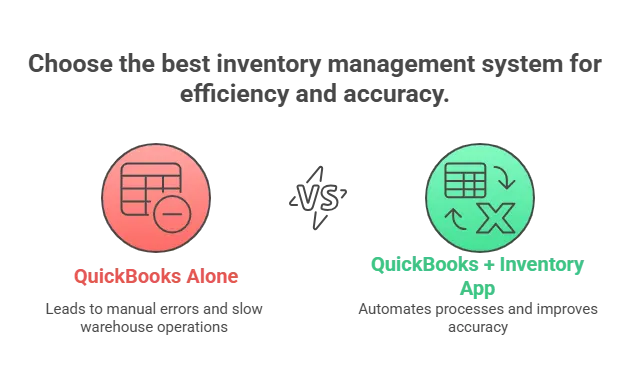
Why QuickBooks + an inventory app beats accounting-only
- Less re-keying, fewer errors:
When you run only on QuickBooks, every order, bill, and receipt often has to be keyed in twice—once in your warehouse or sales system and again in QuickBooks. That wastes time and increases errors. With an integrated inventory app, orders flow automatically into QuickBooks. No duplicate entry. No mismatched numbers. Your accounting stays accurate while your staff saves hours every week. A QuickBooks-compatible inventory solution ensures you’re not just managing books—you’re managing operations in real time.
- Faster warehouse work:
QuickBooks alone wasn’t built for warehouse speed. Warehouse teams need barcodes, mobile scanning, and real-time updates. An inventory app gives them tools to receive shipments, pick orders, and run cycle counts right on the floor without paper. That means fewer mis-picks, faster order turnaround, and tighter control of stock—all while keeping QuickBooks in sync.
- Right stock, right place:
Accounting-only tools don’t warn you when shelves are about to run empty or when one location is sitting on excess while another is short. An inventory app adds reorder points, automatic alerts, and multi-location visibility. You can see stock across warehouses, stores, or trucks, and move it before problems hit. This matters because stockouts and overstocks aren’t small issues—they drive the global retail industry’s $1.77 trillion annual leakage (lost sales and wasted inventory) as reported by Retail TouchPoints. The right app helps you plug that leak and keep working capital where it belongs.
Making the call (a simple decision flow)
Choosing the right tool isn’t about having the “best” software overall. It’s about matching the tool to your business model and what you actually need day to day. Choosing the right QuickBooks-compatible inventory solution ensures your stock, sales, and finances stay aligned-without leaving QuickBooks. Here’s how to think through it:
- If you’re mainly retail or wholesale…
Your headaches are usually around stock accuracy, barcodes, and keeping multiple locations in sync without blowing the budget. You don’t need enterprise-level manufacturing features—you need speed, control, and something affordable. That’s where GOIS fits best. It gives you barcode scanning, mobile access, and multi-location management in one package, without the heavy price tag.
- If you’re living in QuickBooks Online and want the best feature-to-price balance…
QuickBooks does a solid job at accounting, but inventory is thin. If you don’t want to overspend but still need better stock control, SOS Inventory is a strong choice. It was built to work tightly with QBO and gives you a lot of bang for the buck—sales orders, assemblies, and shipping without a huge learning curve.
- If you manufacture with routings and need warehouse muscle…
Once you move into true manufacturing, your needs shift. You’re not just tracking boxes; you’re scheduling jobs, managing routings, and running a warehouse that can’t afford mistakes. That’s where deeper systems like Fishbowl or Cin7 Core come in. They add WMS-level features—bin locations, lot/serial tracking, advanced assemblies—so you can keep production and fulfillment running smoothly.
- If you want a modern MRP with slick shop-floor control…
Some businesses care less about distribution depth and more about a clean, modern way to run their factory floor. If that’s you, look at Katana. It’s built as a modern MRP with intuitive shop-floor control—drag-and-drop scheduling, live inventory for raw materials, and a simple interface your team can actually use without a week of training.
Frequently Asked Questions (FAQ’s)
1. Can I use GOIS with both QuickBooks Online and Desktop?
Yes. GOIS syncs bi-directionally with QBO and QuickBooks Desktop, keeping your items, POs, invoices, and stock levels always in sync.
2. Will it work for multiple warehouses or stores?
Absolutely. GOIS tracks inventory per location, lets you transfer stock between sites, and supports cycle counts to keep everything accurate.
3. Does GOIS handle barcodes, lots, and serial numbers?
Yes. You can scan items via mobile devices, track lot/serial numbers, and monitor expiry dates, which is ideal for regulated goods like food, pharma, or electronics.
4. Can I manage kits, assemblies, or light manufacturing?
Yes. GOIS supports BOMs (Bills of Materials) and kitting, so you can produce finished goods automatically while keeping costs and stock accurate in QuickBooks.
5. How does GOIS integrate with eCommerce and shipping platforms?
GOIS connects to Shopify, Amazon, and shipping carriers like UPS/FedEx. Orders flow in automatically, stock updates in real-time, and shipping details sync without manual work.

Naushad Ahmed 
Naushad Ahmed is a technology expert at Goods Order Inventory (GOIS) specializing in inventory management, order fulfillment, and warehouse operations for small and mid-sized businesses. He shares practical insights on inventory control, stock accuracy, automation, and multi-location management to help businesses move beyond spreadsheets, reduce stockouts and overstock, and scale their operations efficiently.