
With the changing customer demands and inventory management needs, small businesses are finding themselves under pressure of managing orders from multiple channels.
They are keep struggling to keep inventory updated in their record and operating warehouses smoothly. But currently their manual processes or basic version of order management software are lacking to handle returns, disrupting accounting and reporting is reactive instead of active.
So, here comes the central question, why and what you exactly need in your order management software to meet often order management needs?
Secondly, what features need to prioritize while upgrading or choosing the order management system for small businesses?
Thirdly, how much does it cost to own order management system for small businesses with latest features?
Don’t panic, let’s break the silence and get the answer to the questions…
The Operational Reality of Growing Small Businesses
If you are asking why there is a need to bring a change in existing order management systems for small businesses, then simple and straight answer is the “Changing Operational Requirements”.
Ready to Simplify Your Order Management?
See how a smarter system can save time, reduce errors, and scale your business.
Request a Demo →As soon as you expand beyond one sales channel to multiple complex sales channels, your system will show you the operational gaps.
You may be managing online store, marketplaces, B2B wholesale orders, retail POS, multiple warehouses or third-party logistics– but what if you dont have a structured system to manage it?
Without a well-structured system, this is what happens:
| Operational Gap | Business Impact |
|---|---|
| Manual order consolidation | Missed or duplicate orders |
| Delayed stock updates | Overselling & cancellations |
| Warehouse confusion | Slower dispatch |
| No visibility into margins | Shrinking profitability |
| Manual reporting | Delayed decision-making |
An advanced order management system is not just about efficiency, it about having a system with right features and strong operational control.
Let’s understand what features you need to prioritize in order management system…
7 Must-Have Features in Order Management System for Small Businesses
Running a small business is rewarding- until your order start piling up, inventory goes missing and customers are asking where their packages are.
Every day without the right tools, small business owners lose time, money and customers. 40% of orders are delayed due to poor inventory visibility. There are 3X more errors occurring with manual order entry.
If this situation sounds similar or familiar, then its time to pay attention to these features in order management software for small business
1. Real-Time Inventory Tracking
Small businesses that are relying on manually updating their order data are often making their teams to make wrong decision – based on outdated data.
The success begins when your inventory updates the moment an order is placed not when someone remembers to check.
Real-time tracking updates eliminates overselling, prevents stockouts, and gives you a live view of what’s in stock, what’s on order, what’s in process and what’s running low.
- Live Stock Levels: See every SKU updated instantly across all sales channels.
- Low-Stock Alerts: Get notified before you run out of bestselling products during peak time.
- Multi-Location Support: Track inventory across warehouses and retail locations and providing consolidated view of inventory.
2. Multi-Channel Order Consolidation
With advanced order inventory management solutions like GOIS, you will be having one dashboard to managing sales and order from every Channel. Whether you are selling on Shopify, Amazon, eBay, and in-store- you can access everything from a single platform.
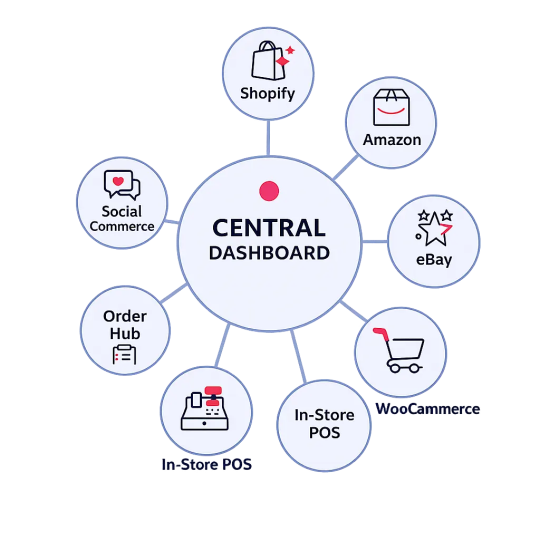
You shouldn’t need five different logins. The best order management software pulls every order into a single, unified dashboard, so you never miss a sale, no matter where it comes from.
Businesses using multi-channel consolidation report up to 30% faster order processing times and experience better ROI.
3. Automated Order Routing & Faster Fulfilment
Stop manually assigning orders to warehouses or team members. This not only leads to manual errors but also slow down the entire fulfilment process.
This is where you need to integrate smart automated order routing feature which routes each order to the right location, picks the optimal shipping method, and triggers fulfilment, all without any friction.
Automation like this can reduce fulfilment time by up to 50% and your customers will notice the difference.
4. Customer Communication and Real-Time Navigations
Your customers want to know where their order is- without even having to email you. Built-in tracking updates, automated shipping notifications, and delivery confirmations keep customers informed and satisfied about ordering products. Having this feature in order management software for small businesses can help reducing support queries by up to 40%.
- Automated Alerts: Right from confirming orders, shipping, to delivery- customers get updates at every stage of order processing.
- Live Tracking Links: This feature enables customers to access shareable tracking links, directly sent to customers’ inboxes.
- Fewer Support Tickets: Proactive communication dramatically cuts “Where’s my order queries.
5. Integrating Software with Your Existing Tools
The best order management software doesn’t replace your tech stack; it actually connects the existing system with it.
Prioritize the order management system that ensures smooth integration with your ecommerce platform, accounting software, shipping carriers, and CRM. The goal is to make a connected ecosystem, not another complicated tool.
6. Smart Reporting & Analytic Dashboard
You might be managing order management operations with multiple tools. But gathering data from different tools always lacks giving an overview of the order inventory management.
Data is only useful if you can understand it and enable you to make a consolidated decision. A great order management system is integrated with smart dashboards that track everything to give you clear, actionable reports on sales trends, top products, fulfilment speed, and customer behaviour, so you can make smarter decisions faster.
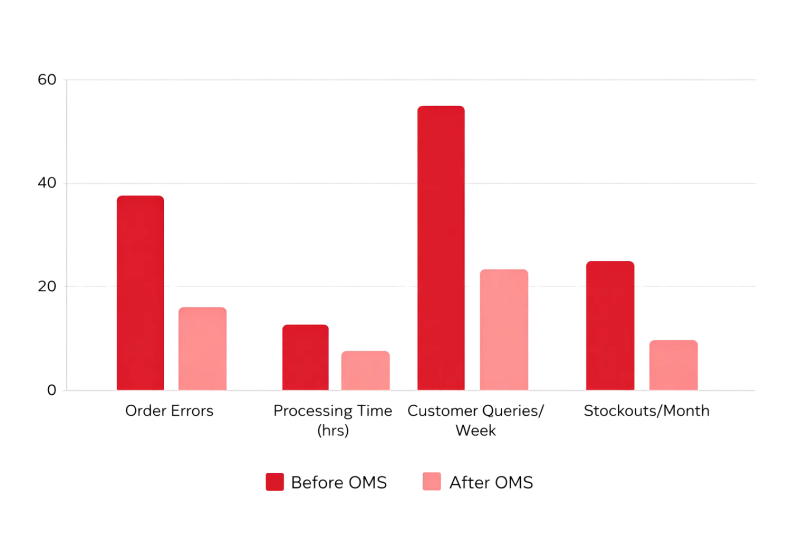
Key Reports and Analytics that work on:
- Sales driven through multiple channels and products
- Fulfilment speed and accuracy
- Inventory turnover rates
- Customer order history
- Return and refund tracking
If you’re searching for the best order management software for small business, keep in mind that robust reporting is a non-negotiable feature.
7. Scalability & Affordable Pricing
The best order management system should grow with you. You need a solution that works today at 50 orders a day and still performs well with the 5,000 SKUs in the near future.
But at the same time, you can’t drain the budget. Look for tiered pricing or a flexible pricing model where there are no locking contracts. It should have features that must be unlocked as you scale and doesn’t need any upgrades in the near future.
- Starter: Up to 500 orders/month, essential features, minimal cost
- Growing: Up to 5,000 orders/month, automation and integrations included
- Scaling: Unlimited orders, advanced analytics, multi-warehouse, API access
Order Management Software Selection Checklist
Before choosing an order management software for a small business, make sure it checks every box below. GOIS, Good Orders Inventory System, is a modern order management system built with all seven features and committed to offering seamless processing and order fulfilment. The user-friendly interface empowers small businesses with flexibility and scalability to scale without any hiccups.
Final Words
Small businesses don’t struggle because they lack sales; they struggle because their growing needs demand a structured system. More orders should mean more revenue, not more confusion, refunds, delayed shipments, or late-night reconciliations.
When you migrate from spreadsheets to advanced order management system, you can better manage sales through multiple-channels and able to bridge operational gaps.
The right order management software for small businesses doesn’t just organize transactions; it protects margins, eliminates blind spots, improves fulfilment speed, and reduces human errors.
Among various options, GOIS is one of the most sustainable order management software for small businesses that ensures scalability and growth.
Frequently Asked Questions (FAQ’s)
1. What exactly does order management software for small business?
Order management software for small business means a system that centralizes order processing, inventory tracking, fulfilment management, and reporting. Basically, it helps you switch from disconnected tools to a consolidated platform and helps small businesses streamline operations.
2. How is order management software for small business different from inventory software?
Inventory software focuses primarily on stock tracking. An order management system covers the entire order lifecycle — from order capture to fulfilment, returns, and financial reporting.
3. Can order management software for small business integrate with accounting tools?
Yes. Modern systems integrate with accounting platforms, ERPs, tax modules, and payment gateways to ensure financial accuracy and real-time reporting.
4. What makes the best order management software for small business?
The right solution offers: Real-time inventory sync, Multi-channel consolidation, Smart order routing, Automated workflows, Returns management, Advanced analytics, and Scalability.
5. Is order management software for small business suitable for multi-warehouse businesses?
Yes, in fact, multi-location management is one of its biggest advantages, enabling better stock allocation and faster fulfilment.

Naushad Ahmed 
Naushad Ahmed is a technology expert at Goods Order Inventory (GOIS) specializing in inventory management, order fulfillment, and warehouse operations for small and mid-sized businesses. He shares practical insights on inventory control, stock accuracy, automation, and multi-location management to help businesses move beyond spreadsheets, reduce stockouts and overstock, and scale their operations efficiently.