This guide shows you the Reorder point formula, worked examples, and how to scale it across products and locations.
What is a Reorder Point?
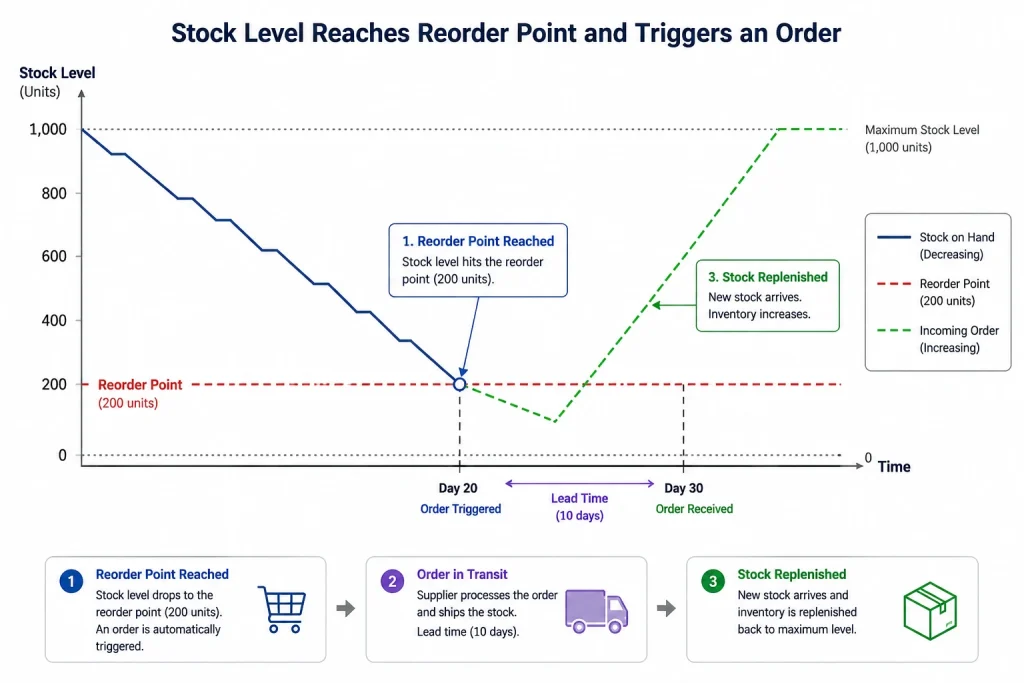
A reorder point (ROP) is the stock level at which you place a new order so replenishment arrives just before you run out. Set it correctly and you maintain continuous availability without overstocking. It’s one of the most practical inventory control techniques because it converts demand and lead-time data into a single, clear trigger.
The Reorder Point Formula
Reorder Point Formula = (Average Daily Sales × Lead Time in Days) + Safety Stock
The first part—average daily sales multiplied by lead time—is your lead time demand, the stock you’ll sell while waiting for the order to arrive. Adding safety stock protects you if demand or lead time runs higher than expected.
Step-by-Step Calculation
Example: You sell 20 units a day. Your supplier’s lead time is 5 days. You hold 75 units of safety stock.
- Lead time demand = 20 × 5 = 100 units
- Add safety stock: 100 + 75 = 175 units
When stock drops to 175 units, you place your order. By the time it arrives, you’ll have used roughly your lead time demand and dipped into the buffer only if something went off-plan.
Reorder Point With vs. Without Safety Stock
Without safety stock, your reorder point equals lead time demand alone (100 units in the example). That works only if both demand and lead time are perfectly stable—rare in practice. Adding safety stock is what makes the reorder point reliable in the real world. The more variable your demand or supply, the more important that buffer becomes.
Reorder Points for Multiple Products and Locations
The formula is simple for one product, but most businesses manage hundreds across several warehouses—each with different sales velocities and lead times. A few principles help:
- Calculate per SKU, per location. A product that sells fast in one warehouse may move slowly in another.
- Use location-specific lead times. Suppliers often deliver to different sites on different schedules.
- Review regularly. Sales velocity and lead times drift, so static reorder points decay over time.
This is where manual tracking collapses: maintaining accurate reorder points for thousands of SKU-location combinations in a spreadsheet is impractical.
How to Automate Reorder Points
A cloud inventory management system calculates a reorder point for every product and location from live sales history and supplier performance and then alerts you—or auto-generates a purchase order—the moment stock hits the trigger. Pair it with warehouse management and reporting and analytics, and your reorder points stay accurate as your business changes.

Never run out, never over-order. GOIS sets and monitors reorder points across every product and warehouse, then triggers replenishment automatically. Request a demo
Key Takeaways
- Reorder point formula= (average daily sales × lead time) + safety stock.
- Safety stock is what makes the trigger reliable under real-world variability.
- Calculate reorder points per SKU and per location.
- Automation keeps reorder points accurate as demand and lead times shift.
Frequently Asked Questions
What’s the difference between reorder point and reorder quantity?
The reorder point is when to order (a stock level). The reorder quantity—often set with EOQ—is how much to order.
Should every product have the same reorder point?
No. Each product’s reorder point depends on its own sales rate, lead time, and safety stock, so they vary widely.
How often should I update reorder points?
Review them regularly—monthly or quarterly for most businesses, or continuously if you use software, since demand and lead times change.
Conclusion
The reorder point turns two numbers you already track—sales velocity and lead time—into a precise replenishment trigger, with safety stock guarding against surprises. Calculate it per product and location, keep it current, and you protect availability without drowning in excess stock. The simplest way to keep thousands of reorder points accurate is to let software manage them.
See Automated Reordering in Action
Discover how GOIS automatically monitors inventory levels, triggers replenishment orders, and prevents stockouts across all your warehouses—without manual intervention.
Request a Demo
Naushad Ahmed 
Naushad Ahmed is a technology expert at Goods Order Inventory (GOIS) specializing in inventory management, order fulfillment, and warehouse operations for small and mid-sized businesses. He shares practical insights on inventory control, stock accuracy, automation, and multi-location management to help businesses move beyond spreadsheets, reduce stockouts and overstock, and scale their operations efficiently.