QuickBooks is one of the most widely used accounting platforms for small and medium-sized businesses. It’s fast, reliable, and built to simplify your bookkeeping, payroll, and financial reporting. But when it comes to inventory management, QuickBooks alone can feel limited—especially if your business deals with large product catalogs, multiple warehouses, or complex stock movements.
That’s where a QuickBooks inventory software like GOIS (Goods Order Inventory System) becomes essential. By integrating GOIS with QuickBooks, you create a seamless bridge between your accounting and your inventory operations. This means fewer manual updates, fewer errors, and a single source of truth for your entire business.
| According to Procurement Tactics, 43% of small business owners lose money due to poor inventory tracking, mostly because they rely on manual systems or non-integrated tools. This is exactly the problem GOIS solves. |
The QuickBooks POS Discontinuation — A Growing Concern
In 2023, Intuit officially discontinued its QuickBooks Point of Sale (POS) system. For many small and mid-sized retailers, this left a major gap in daily operations—especially for those who relied on POS to manage in-store sales, inventory counts, and customer transactions. Without a replacement, businesses are now facing challenges such as:
- Manual sales entry into QuickBooks after each transaction
- Delayed inventory updates, leading to stockouts or overstocking
- Loss of integrated reporting between sales and accounting
- Extra time spent reconciling orders at the end of the day
The good news? Integrating QuickBooks with an inventory solution that includes POS capabilities—like GOIS – solves this problem immediately.
GOIS offers a built-in POS module that works both online and offline, automatically syncing sales data, updating inventory counts in real time, and pushing financial data to QuickBooks without manual input. This means you can process sales, manage returns, and track customer purchases without losing the automation you had in QuickBooks POS.
| Navigating the Transition: Migrating from QuickBooks POS to GOIS – Read More |
Understanding QuickBooks Inventory Management
QuickBooks offers basic inventory management features designed to help small and medium-sized businesses track their stock levels, manage purchase orders, and generate reports. While not as robust as dedicated inventory management software, QuickBooks can be a valuable tool for businesses with relatively simple inventory needs.
Core Features of QuickBooks Inventory Software
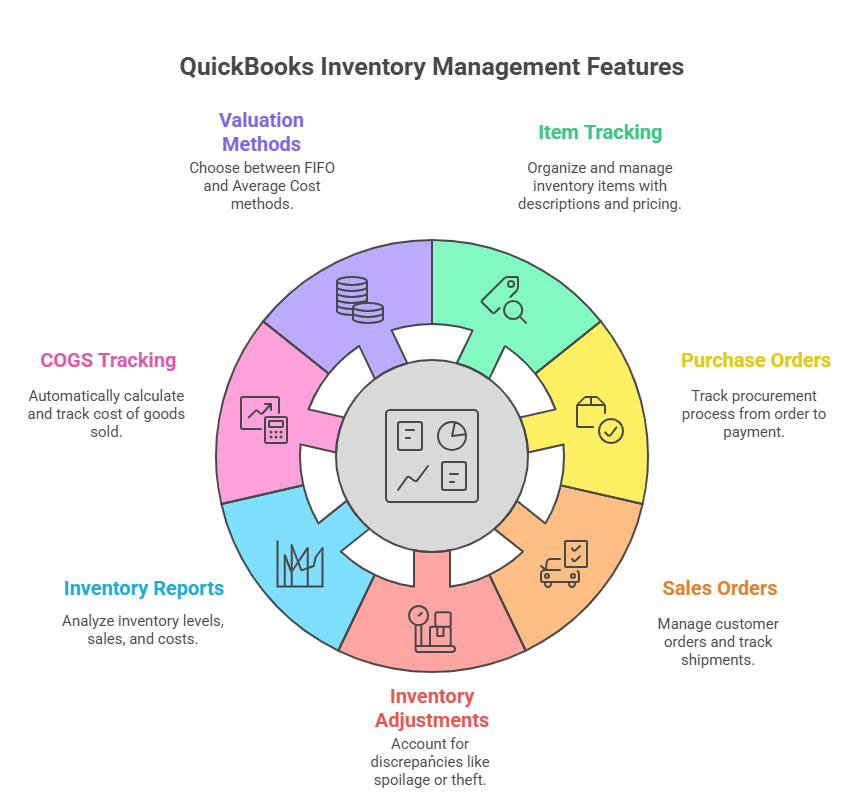
- Item Tracking: QuickBooks allows you to create and manage a list of inventory items, each with its own description, cost, and sales price. You can categorize items for better organization and reporting.
- Purchase Orders: You can create and track purchase orders to manage your procurement process. QuickBooks allows you to record when items are ordered, received, and paid for.
- Sales Orders: Similar to purchase orders, you can create and track sales orders to manage customer orders. This helps you keep track of what needs to be shipped and invoiced.
- Inventory Adjustments: QuickBooks allows you to make adjustments to your inventory levels to account for spoilage, theft, or other discrepancies.
- Inventory Reports: QuickBooks provides a variety of reports that can help you track your inventory levels, sales, and costs. These reports can be used to make informed decisions about purchasing and pricing.
- Cost of Goods Sold (COGS) Tracking: QuickBooks automatically calculates and tracks your COGS, which is an important metric for understanding your profitability.
- Inventory Valuation Methods: QuickBooks supports different inventory valuation methods, such as FIFO (First-In, First-Out) and Average Cost.
Limitations of QuickBooks Inventory Software
While QuickBooks offers useful inventory management features, it also has limitations that can hinder businesses with more complex needs:
- Limited Scalability: As your business grows and your inventory becomes more complex, QuickBooks may not be able to keep up.
- Lack of Advanced Features: QuickBooks lacks advanced features such as barcode scanning, lot tracking, and warehouse management.
- Manual Data Entry: QuickBooks often requires manual data entry, which can be time-consuming and prone to errors.
- Limited User Access Control: QuickBooks may not offer the granular user access control needed to protect sensitive inventory data.
- Reporting Limitations: While QuickBooks offers a variety of reports, they may not be customizable enough to meet the specific needs of your business.
- No Real-Time Inventory Visibility: QuickBooks may not provide real-time visibility into your inventory levels, which can lead to stockouts or overstocking.
Optimizing QuickBooks for Inventory Management
Despite its limitations, QuickBooks can be optimized for more effective inventory management. Here are some strategies:
- Accurate Item Setup: Ensure that all inventory items are set up correctly with accurate descriptions, costs, and sales prices.
- Regular Inventory Audits: Conduct regular physical inventory counts to verify the accuracy of your inventory data.
- Utilize Inventory Reports: Regularly review inventory reports to identify trends, track sales, and make informed decisions about purchasing and pricing.
- Implement a Barcode System: Consider implementing a barcode system to streamline data entry and improve accuracy. While QuickBooks doesn’t natively support advanced barcode scanning, third-party integrations can bridge this gap.
- Train Your Staff: Ensure that your staff is properly trained on how to use QuickBooks for inventory management.
- Use Inventory Adjustments Wisely: Use inventory adjustments to account for discrepancies, but be sure to investigate the root cause of the discrepancies to prevent them from happening again.
- Choose the Right Inventory Valuation Method: Select the inventory valuation method that best suits your business and industry.
- Regularly Update QuickBooks: Keep your QuickBooks software up to date to ensure that you have the latest features and security updates.
When to Consider a Dedicated Inventory Management Software
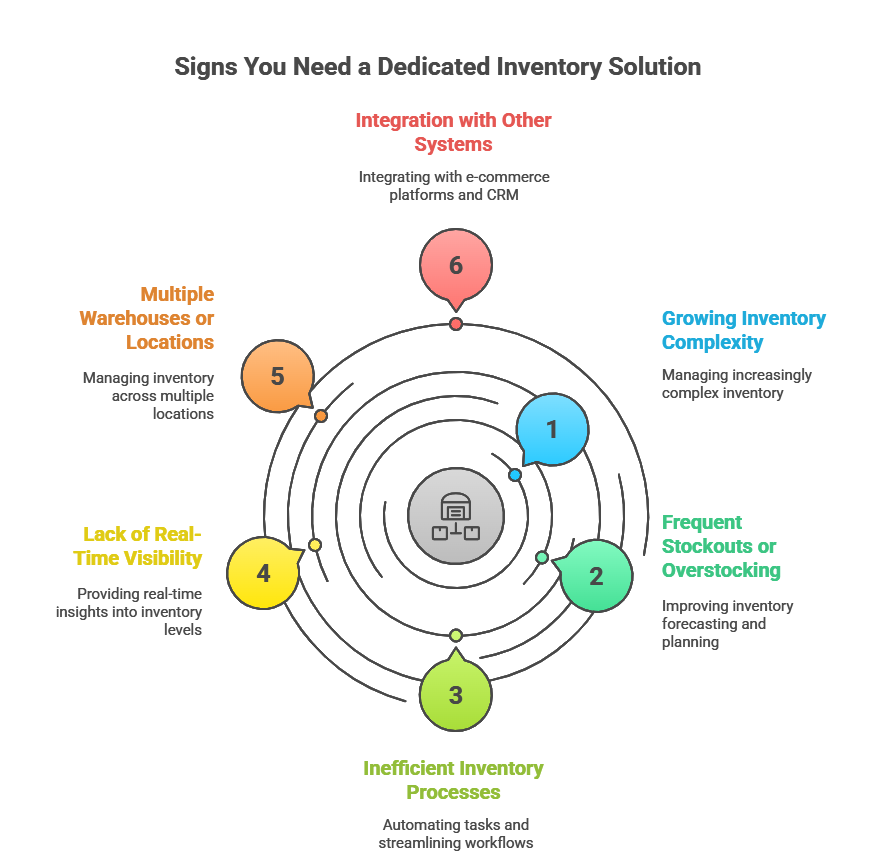
For businesses experiencing the limitations of QuickBooks inventory software, a dedicated inventory management solution may be necessary. Here are some signs that it’s time to upgrade:
| Top 10 Inventory Management Systems to Watch Out For in 2025 – Read More |
- Growing Inventory Complexity: If your inventory has become too complex for QuickBooks to handle, a dedicated solution can provide the advanced features you need.
- Frequent Stockouts or Overstocking: If you’re experiencing frequent stockouts or overstocking, a dedicated solution can help you improve your inventory forecasting and planning.
- Inefficient Inventory Processes: If your inventory processes are inefficient and time-consuming, a dedicated solution can help you automate tasks and streamline workflows.
- Lack of Real-Time Visibility: If you need real-time visibility into your inventory levels, a dedicated solution can provide the insights you need.
- Multiple Warehouses or Locations: If you have multiple warehouses or locations, a dedicated solution can help you manage your inventory across all locations.
- Integration with Other Systems: If you need to integrate your inventory management system with other systems, such as your e-commerce platform or CRM, a dedicated solution can provide the necessary integrations.
Integrating QuickBooks with Inventory Management Software
Many dedicated inventory management software offer seamless integration with QuickBooks. This allows you to leverage the accounting capabilities of QuickBooks while benefiting from the advanced inventory management features of a specialized solution.
Benefits of Integration
- Improved Accuracy: Integration eliminates the need for manual data entry, reducing the risk of errors.
- Increased Efficiency: Integration automates tasks and streamlines workflows, saving time and improving efficiency.
- Real-Time Visibility: Integration provides real-time visibility into your inventory levels and financial data.
- Better Decision-Making: Integration provides the data you need to make informed decisions about purchasing, pricing, and inventory management.
- Reduced Costs: Integration can help you reduce costs by improving inventory control and reducing waste.
Popular QuickBooks Inventory Management Integrations
Choosing the right QuickBooks inventory software integration can make or break how efficiently your business tracks stock, processes orders, and syncs financial data. Below are some popular solutions that integrate seamlessly with QuickBooks, each offering unique benefits depending on your business model.
1. GOIS (Goods Order Inventory System)
GOIS is an easy-to-use, affordable QuickBooks inventory software option built for small and growing businesses. It’s designed to simplify stock control, purchase management, and order fulfillment without the steep learning curve of complex ERP systems. GOIS integrates with QuickBooks to keep your inventory data in sync with your accounting, so every sale, return, or purchase order automatically updates your books. It’s especially valuable for businesses that want cloud access, real-time reporting, and multi-location tracking—all without breaking the budget.
QuickBooks vs. QuickBooks + GOIS: Feature Comparison
| Feature | QuickBooks Inventory Software Alone | QuickBooks + GOIS |
|---|---|---|
| Basic inventory tracking | Available | Available |
| Multi-location tracking | Limited or Enterprise only | Full support |
| Barcode & lot/serial tracking | Not available | Supported |
| Manufacturing workflows (BOM, Kitting) | Not supported | Built-in |
| Automated reordering | Manual alerts | Fully automated |
| Advanced reporting & forecasting | Basic | Comprehensive |
2. Fishbowl Inventory
Fishbowl is a robust manufacturing and warehouse management solution designed for businesses that require advanced inventory control. It offers features like barcode scanning, part tracking, and work order management. Its integration with QuickBooks helps ensure that all inventory transactions—purchases, sales, adjustments—are automatically reflected in your accounting system, reducing manual data entry and minimizing errors.
3. QuickBooks Commerce
TradeGecko, rebranded as QuickBooks Commerce, is tailored for e-commerce businesses that sell across multiple platforms. It allows users to manage orders, track products, and oversee multiple sales channels from one dashboard. The QuickBooks integration ensures that every sale is accounted for in real time, giving you accurate profit margins and financial statements without extra admin work.
4.Cin7
Cin7 is a cloud-based inventory management platform ideal for omnichannel retailers. It provides features like built-in POS (Point of Sale), automated order routing, and integration with over 700 third-party platforms. When paired with QuickBooks, Cin7 ensures your inventory costs, stock movements, and revenue data are updated instantly, helping you maintain precise records for better decision-making.
5. Zoho Inventory
Zoho Inventory is another cloud-based solution that integrates seamlessly with the Zoho ecosystem and QuickBooks. It’s best suited for small to mid-sized businesses needing a simple yet powerful inventory tracking tool. Zoho Inventory allows you to track shipments, manage warehouses, and automate order workflows while syncing financial data directly to QuickBooks for clean and organized accounting.
Final Thoughts
QuickBooks is excellent for managing your finances, but for growing businesses, it needs a powerful inventory partner. GOIS fills that gap with advanced tracking, real-time sync, and robust reporting — all while keeping your accounting in perfect order.
Ready to upgrade your QuickBooks inventory management?
👉 Try GOIS with QuickBooks Today and take full control of your stock.
Frequently Answered Questions (FAQ’s)
1. What is QuickBooks inventory software?
QuickBooks inventory software refers to tools and systems that integrate with QuickBooks to help businesses track stock levels, manage orders, update accounting records automatically, and streamline inventory processes. It ensures that both your financial and inventory data stay accurate and in sync.
2. Why should I integrate my inventory management system with QuickBooks?
Integrating your inventory system with QuickBooks eliminates manual data entry, reduces errors, and keeps your financials updated in real time. This means sales, purchase orders, and stock adjustments automatically reflect in your accounting records, saving time and improving accuracy.
3. How does GOIS work with QuickBooks for inventory tracking?
GOIS (Goods Order Inventory System) connects directly to QuickBooks, allowing you to manage products, track stock across locations, handle purchase and sales orders, and instantly push updates to your accounting records. This integration helps small and medium businesses maintain real-time inventory accuracy while simplifying bookkeeping.
4. Can QuickBooks inventory software work for multiple locations?
Yes—many QuickBooks-compatible inventory systems, including GOIS, offer multi-location tracking. You can monitor stock in different warehouses or stores, transfer items between locations, and view consolidated reports for better decision-making.
5. Is QuickBooks inventory integration suitable for small businesses?
Absolutely. While large companies benefit from the automation, small businesses gain the most value because integration saves hours of manual work, improves order accuracy, and gives a clearer financial picture without hiring extra staff.

Naushad Ahmed 
Naushad Ahmed is a technology expert at Goods Order Inventory (GOIS) specializing in inventory management, order fulfillment, and warehouse operations for small and mid-sized businesses. He shares practical insights on inventory control, stock accuracy, automation, and multi-location management to help businesses move beyond spreadsheets, reduce stockouts and overstock, and scale their operations efficiently.