...
Next-Gen Inventory Management Solution

Next-Gen
Cloud Inventory Management Software

Gain real-time visibility and control with cloud inventory management.

Inventory that
moves as fast
as your business

GOIS unifies inventory, warehousing, purchasing, manufacturing, and shipping into one cloud platform so you always know what you have, where it is, and what to order next.

JM SR AP KL
Barcode scanned · SKU-1042
Inventory overview ● Live
4,821
SKUs active
↑ 12%
98.4%
Accuracy
↑ 2.1%
3
Warehouses
↑ 1 new
Electronics 78%
Apparel 54%
Home Goods 31%
#ORD-9821 Shipped $2,450
#ORD-9820 Processing $890
#ORD-9819 Pending $1,240
Shipped via FedEx · tracking live
2,400+
Businesses worldwide
20+
Countries served
99.9%
Platform uptime
35%
Average cost reduction
Industries
Trusted across 10+ industries

From retail to pharmaceuticals GOIS adapts to how your business operates.

Retail &
E-commerce
Manufacturing
Wholesale &
Distribution
Automotive
Construction
Liquor
Distribution
Pharmaceutical
3PL &
Logistics
Transportation
Home Decor
Point of Sale
Built-in POS sell anywhere, manage everything

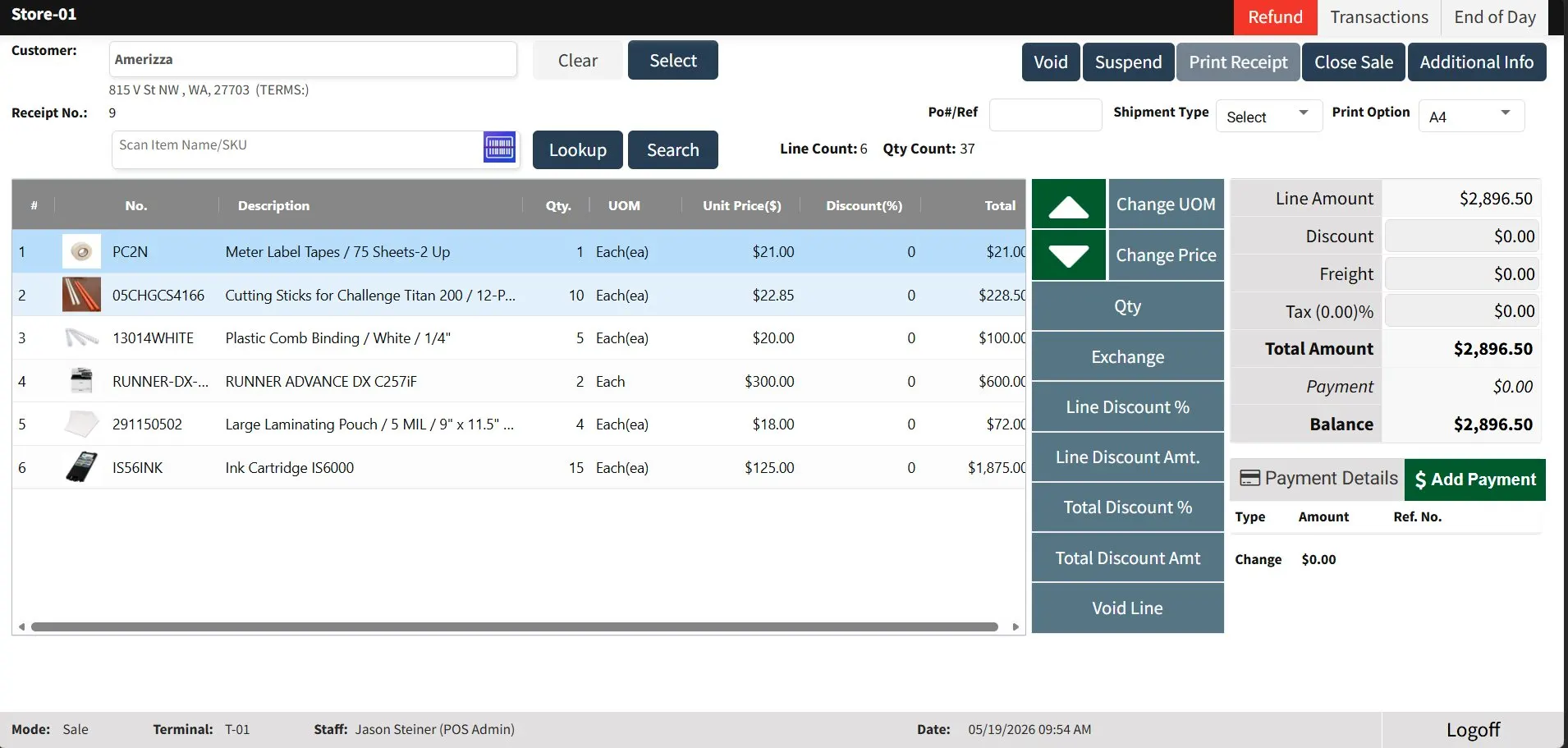
GOIS includes a full-featured Point of Sale system and a powerful POS Admin panel no third-party app needed. Run your store counter and back-office from one connected platform.

POS Terminal

Fast, intuitive checkout right from your browser

Process sales, handle refunds, apply discounts, and manage multiple payment types from a clean, touch-friendly interface. Works on any device, no hardware lock-in.

Multi-item transactions Add items by scan, SKU search, or lookup supports quantity, UOM, and per-line discounts
Refund & void support One-click refunds and line voids with full transaction history tied to every sale
Customer & receipt management Attach a customer to any sale, print A4/thermal receipts, and email copies instantly
Real-time inventory sync Every sale auto-decrements stock inventory stays accurate without manual updates
Sale completed · $2,896.50
Store-01 POS Terminal T-01
GOIS POS Terminal Screenshot
Receipt No. 9 · 6 line items
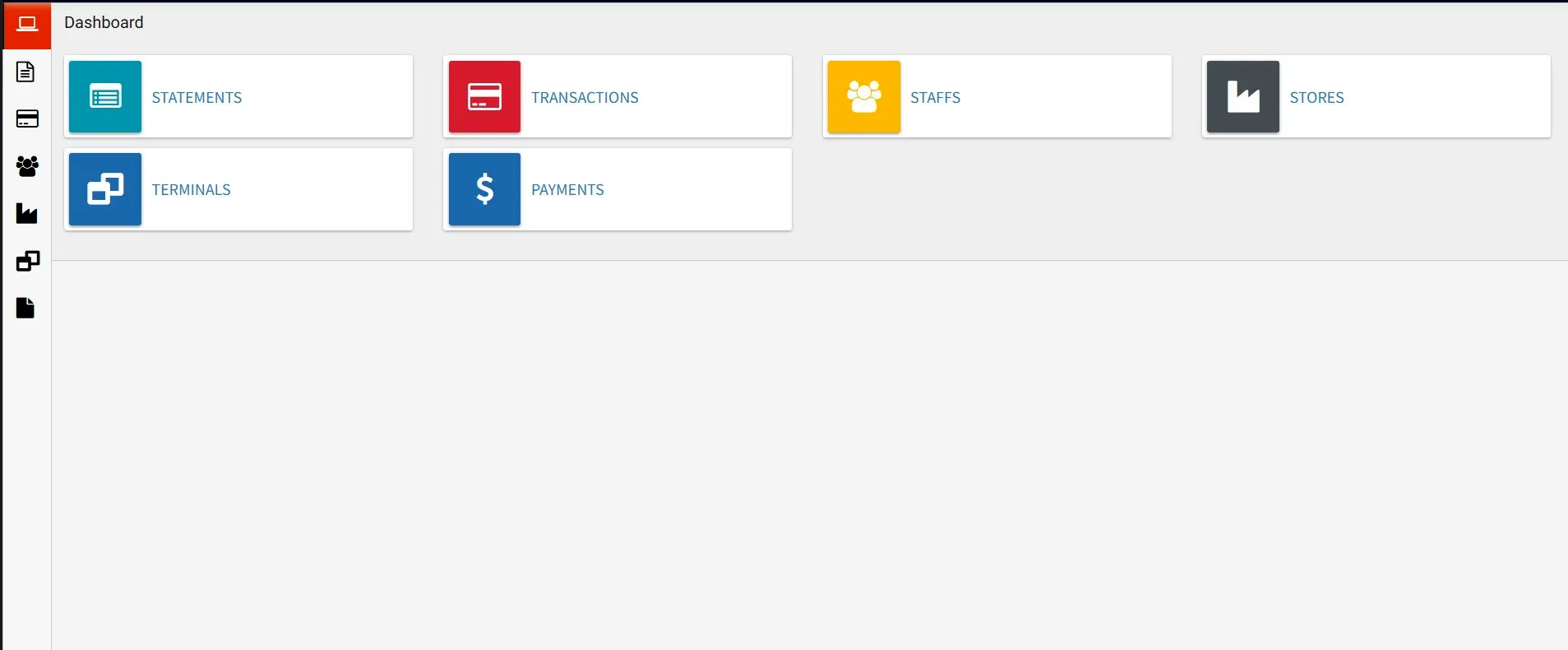
POS Admin

Full back-office control from one dashboard

The POS Admin panel gives managers a complete view of sales activity, staff performance, terminals, stores, and payment records all in one place, with real-time data.

Transaction management Browse, filter, and audit every transaction across all terminals and stores in real time
Staff & role control Manage cashier access, set permissions, and track individual staff performance
Multi-store & terminal setup Add stores, configure terminals, and control which staff can access each location
Payment & statement reports View payments by method, generate end-of-day statements, and reconcile cash drawers
3 stores · 5 terminals active
POS Admin Dashboard
GOIS POS Admin Screenshot
Michael Weasley · POS Admin
Warehousing module
Advanced warehousing,
built right into GOIS

No separate WMS needed. GOIS gives your warehouse team a complete operational toolkit from item control and cycle counts to smart putaway and bin-level movements.

GOIS Warehouse
📦
Item Active
⚖️
Stock Adjustment Active
Pick List Active
📋
PO Receiving List Active
🔄
Cycle Count Active
🏷️
PutAway Active
🔀
Movements Active
📦
Item management
Full product & SKU control
Manage every SKU with detailed attributes, categories, units of measure, and custom fields. Track items across multiple warehouses with real-time visibility into stock levels, valuations, and movement history.
Product attributes & variants
Custom fields & categories
Units of measure conversion
Stock valuation (FIFO/AVCO)
Item images & barcodes
Expiry & batch tracking
⚖️
Stock adjustment
Accurate inventory corrections
Make manual stock corrections with a full audit trail. Adjust quantities, costs, or locations with reason codes every change is logged, timestamped, and tied to a user for complete accountability.
Positive & negative adjustments
Reason code classification
Full audit log with timestamps
Multi-location adjustments
Cost correction support
Approval workflow optional
Pick list
Optimized order picking
Generate intelligent pick lists based on order priority and warehouse layout. Guide pickers with optimized bin sequences, scan-to-confirm validation, and real-time progress tracking from any mobile device.
Auto-generated from orders
Bin-sequence optimization
Scan-to-confirm picking
Partial pick support
Priority-based queuing
Real-time progress dashboard
📋
PO receiving list
Accurate goods-in processing
Receive purchase orders with barcode scanning and quantity verification. Match incoming goods against PO line items, flag discrepancies, and automatically update inventory upon confirmation.
PO line-by-line verification
Barcode scan receiving
Quantity & condition checks
Discrepancy flagging & notes
Auto inventory update on save
Partial receipt support
🔄
Cycle count
Continuous inventory accuracy
Replace disruptive annual stocktakes with rolling cycle counts. Schedule counts by location, category, or ABC classification. Staff scan and count on mobile GOIS calculates variances automatically.
Scheduled & ad-hoc counts
ABC classification support
Location & category filters
Mobile scan counting
Automatic variance calculation
Blind count option
🏷️
PutAway
Smart bin assignment on receipt
Direct received goods to the right bin immediately after receiving. GOIS suggests optimal putaway locations based on item type, size, and bin capacity reducing travel time and maximising space.
Rule-based bin suggestions
Capacity-aware routing
Item-type classification
Zone & aisle assignment
Mobile guided putaway
Bin utilisation reporting
🔀
Movements
Complete transfer & relocation control
Move stock between bins, locations, or warehouses with a full movement log. Track inter-warehouse transfers, internal relocations, and consignment movements all with scan verification.
Bin-to-bin transfers
Inter-warehouse movements
Consignment tracking
Scan-verified relocation
Full movement audit log
Real-time inventory sync
Workflows
See GOIS in action

Step through the key workflows your team will use every day.

Receive & track stock in minutes

When goods arrive, GOIS guides your team through a fast, accurate receiving process from scanning to shelf assignment.

1

Scan purchase order barcode

Instantly match incoming goods to your open PO.

2

Verify quantities & condition

Flag discrepancies in real time against the PO.

3

Assign bin location

Scan or assign a bin stock updates immediately.

4

Inventory synced everywhere

Visible to sales, purchasing, and fulfillment instantly.

Receiving workflow
Scan incoming PO barcode
Match & verify quantities
Assign bin location
Inventory auto-updated
Stock live across all locations

Fulfill orders faster, with zero errors

From order receipt to shipping label GOIS orchestrates every fulfillment step with mobile-ready pick-pack-ship.

1

Order auto-routed to warehouse

Assigned to the best warehouse by stock and proximity.

2

Pick list generated & assigned

Optimized routes. Pickers scan each item to confirm.

3

Pack & generate shipping label

Auto-select carrier. One-click label generation.

4

Customer notified, stock updated

Tracking sent automatically. Inventory reduced instantly.

Fulfillment workflow
Order received from channel
Auto-routed to best warehouse
Pick list optimized & assigned
Pack & print shipping label
Dispatched & customer notified

Never run out automate replenishment

GOIS monitors stock levels and triggers purchase orders automatically when thresholds are hit.

1

Stock hits reorder point

GOIS alerts or auto-generates a PO instantly.

2

PO sent to preferred supplier

Send via email or EDI with one click.

3

Track supplier confirmation

Monitor status and delivery all in one view.

4

Goods received & matched

3-way match: PO, receipt, and invoice.

Purchase order workflow
Reorder point triggered
PO auto-generated
Sent to approved supplier
Delivery tracked in GOIS
3-way match complete

From raw materials to finished goods

Track every production step with work orders, BOM, and real-time material consumption.

1

Create work order from BOM

GOIS auto-populates required materials instantly.

2

Reserve & issue materials

Inventory deducted from stock in real time.

3

Track production progress

Update stages and flag material shortages instantly.

4

Finished goods added to stock

Completed items added automatically ready for sale.

Manufacturing workflow
Work order created from BOM
Materials reserved & issued
Production stages tracked
Quality check completed
Finished goods in stock
Order workflow

From Shopify order to shipped package

Follow every step of the fulfillment lifecycle inside GOIS.

1
🛍

Shopify order

Order placed

2

GOIS sync

Auto-intake

3
🏭

Warehouse

Advanced module

4
📦

Pick & pack

Items confirmed

8

Order closed

Shopify updated

7
🚚

Print & ship

Dispatched

6
💱

Rate compare

Best price

5
🏷

Create Shipping label

Carrier label

🛍
STEP 1 — TRIGGER

Customer places order on Shopify

Checkout is completed on your store. All item, address, and payment details are instantly queued for GOIS to pick up.

E-commerce
STEP 2 — INTAKE

Order auto-synced to GOIS platform

GOIS pulls the order in real time via Shopify integration visible in seconds with all details ready to action.

Automated
🏭
STEP 3 — WAREHOUSE

Advanced warehouse module activated

GOIS checks bin availability, optimizes pick routes, and generates a smart pick list from live inventory data.

Warehousing
📦
STEP 4 — FULFILLMENT

Items picked, verified & packed

Staff scan items bin-by-bin using the GOIS mobile app. Every pick is verified before packing for complete accuracy.

Fulfillment
🏷
STEP 5 — SHIPPING

Carrier label created inside GOIS

GOIS generates the shipping label directly connected to FedEx, UPS, DHL, USPS and more.

Shipping
💱
STEP 6 — RATE COMPARE

Best shipping rate selected

GOIS compares real-time courier pricing and delivery estimates to choose the best shipping option.

Best price
🚚
STEP 7 — DISPATCH

Label printed & shipment dispatched

Label prints directly from GOIS, package handed to carrier, tracking recorded, and inventory auto-decremented instantly.

Dispatch
STEP 8 — COMPLETED

Order closed & Shopify updated

Tracking and fulfillment status sync back to Shopify automatically and the order lifecycle is completed.

Completed
Integrations
Works with the tools you already use

Pre-built integrations with your e-commerce stores, accounting software, and shipping carriers minutes to set up.

Shopify
Amazon
QuickBooks
FedEx / UPS / DHL
Xero
REST API

E-commerce sync

Orders pull in automatically from all sales channels

Accounting

Costs, invoices & POs sync to your books in real time

Shipping carriers

Rate shop, label print & track from inside GOIS

Open API

Connect any custom system with our developer API

Testimonials from Global Companies Powered by GOIS

Frequently Asked Questions

Cloud inventory management is merely an inventory data that is stored online rather than on a local system. Using GOIS, you will have the advantage of checking the stock level, taking orders and updating the inventory at any area or place without necessarily being attached to a single piece of equipment or position.

It eliminates time wastage, manual updates and discrepancies of datas. Due to real-time updates, the teams make decisions faster, eliminate stock problems, and do not need to change systems as they expand.

GOIS is an inventory management tool that is created to enable businesses to remain in control of stock, orders, and locations without a complicated system. It makes all things unified in a single system to ensure that teams operate with correct data.

GOIS is usable by distributors, wholesalers, retailers and expanding businesses that maintain inventory in more than one location or selling channel.

Yes. GOIS provides you with the one-view inventory of a location or all locations, thus you always know where to find stock, and where it is required.

It does. GOIS maintains the stock and inventory maintained in POS systems, online stores, and marketplaces, thus preventing the process of overselling or misrepresenting inventory.

GOIS can update inventory in real time and remind you when you have low inventory, which is more convenient in reordering so that shortages do not hinder sales.

Absolutely. GOIS is used by many teams to address urgent inventory problems, and it is used by them as their operations develop further.

Yes. GOIS is integrated with common accounting and POS systems to ensure that inventory, sales, and financial information stays up to date without additional effort.

Yes. The information is safely stored in the cloud and can only be accessed by authorized users thus only authorized users can update or view the information.

GOIS automates routine activities such as the stock updates, order syncing and reporting which minimizes manual work and human error.

Yes. GOIS displays real-time inventory data and hence teams have access to current stock data.

GOIS helps warehouse teams get through faster and with fewer errors by simplifying picking, packing, transfers and stock checks.

Yes. GOIS is designed to handle large volumes of orders without decreasing speed or compromising the accuracy.

GOIS is simple to install and simple to work with even when the team belongs to non-technical backgrounds.

Yes. You are able to move inventory within warehouses or stores with inventory records being accurate in all locations.

GOIS maintains a good record of stock movement, and auditing is not as difficult and time-consuming.

Yes. Improved insight into the stock and sales trends can avoid overordering and minimize holding costs of the businesses.

Yes. GOIS maintains inventory under synchronization hence all people operate on the same correct information.

It is practical and can be trusted and it is constructed to be used in actual operations, not reports. GOIS can keep the teams in order, precise, and prepared to develop.
SHOW MORE

Sell everywhere, painlessly
Get up and running today.


Schedule a Demo

Book some time with one of our Product Experts to see Goods Order Inventory in action and to start your free trial.